
 Loading...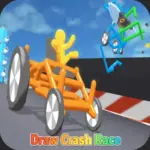










Play Draw Crash Race - Online online for free, an epic creativity challenge where your artistic skills determine your victory! Combine drawing, engineering, and high-speed action in a game that lets you design your own battle vehicle. Simple controls make it easy for anyone to pick up, but winning requires smart strategy.
Master the art of vehicular combat as you progress through increasingly difficult levels. Whether you're playing on a phone, tablet, or computer, Draw Crash Race - Online is packed with intense duels, cool physics, and endless customization possibilities. You get to decide the shape, size, and durability of your car just by drawing a line.
Ready for the adventure? Can you sketch the ultimate machine and smash your opponents off the track?
Discover More About Draw Crash Race
Draw Crash Race is an exciting arcade game that blends puzzle-solving with adrenaline-pumping combat. Initially released in 2022, it quickly became popular among players and earned rave reviews for its unique concept that allows players to be both the designer and the driver.
Created by the talented team at YAD.com, who is known for producing high-quality hyper-casual browser games, Draw Crash Race offers a seamless experience on desktops, tablets, and mobile phones, crafted with a "fun-first" design philosophy to ensure players have a great time wherever they play.
With its vibrant 3D graphics and responsive physics engine, Draw Crash Race continues to be a favorite among fans of creative battle games, cementing its place as one of the top drawing-based action games!
Explore Draw Crash Race Gameplay
| Gameplay Overview | Draw Crash Race is easy to start but challenging to master! The game starts with a blank drawing canvas and an opponent waiting on the track, and as you progress, enemies become larger and stronger. Your main goal is to sketch a vehicle that can push the enemy off the platform, requiring key skills like physics awareness and creative problem-solving. |
|---|---|
| Progression and Features | The game offers a linear level system that increases in difficulty over time. It includes special features like different weapon attachments, varying arena sizes, and stronger enemy vehicles, setting it apart from other games in its category. |
| Gameplay Mechanics | Players draw a continuous line to form the body of their car. Wheels attach automatically to the ends of your line. Players can collect coins from victories and unlock stronger base stats, with improvements affecting gameplay in the following ways: increased power, better stability, and faster speed. |
| Advanced Gameplay | As you advance, you’ll encounter different environments, levels, and challenges including boss battles. Your skills will directly impact your success, as understanding how to lower your center of gravity prevents you from tipping over during a crash. |
Available on All Devices
| Platforms | You can play this game directly in your web browser, whether you're using a desktop, laptop, tablet, or mobile device. |
|---|
Mastering Draw Crash Race: A Guide
In Draw Crash Race, your primary goal is to defeat the opposing vehicle by pushing them off the stage or destroying their car. As you advance, you’ll face challenges like armored enemies and uneven terrain. To succeed, you need to draw shapes that are stable and heavy enough to withstand impact.
As you progress, the difficulty increases, offering new levels and obstacles to overcome. Along the way, you'll find gold coins earned from victories, which will help boost your performance by allowing you to upgrade ink, power, and health. However, be mindful of the failure conditions—if you flip over or get pushed off the edge, you’ll have to restart from the beginning of the match.
The game’s ultimate goal is to clear all levels and defeat the final bosses. Throughout your journey, you'll unlock new challenges, keeping you motivated to keep playing and achieve higher scores.
Controls
Draw Crash Race uses simple drawing mechanics. Here's how you control your battle machine:
| Platform | Controls |
|---|---|
| On Computer: |
|
| On Mobile: |
|
The controls are incredibly intuitive; you just draw a shape, and the game physics handle the rest, making it very easy to learn.
Helpful Tips and Strategies for Draw Crash Race
Want to dominate every duel in Draw Crash Race? These simple and helpful tips will improve your engineering skills and help you unlock cool rewards:
- Keep it Low: Draw shapes with a low center of gravity to prevent your car from flipping over backwards upon impact.
- Add Weight: Larger drawings use more ink, which often makes the car heavier and harder for enemies to push.
- Protect the Pilot: Ensure your drawing covers the front slightly to act as a shield for your driver.
- The Wedge Strategy: Draw a ramp or wedge shape to slide under the opponent and flip them over.
- Watch Your Ink: You have a limited amount of ink per level; keep an eye on the ink bar at the top so you don't run out halfway through a drawing.
- Adapt to Enemies: If an enemy is tall, draw something low. If they are low, try to draw something that can strike from above.
- Upgrade Often: Use your coins to upgrade your Ink capacity first, then Power, then Health.
- Don't Overcomplicate: Sometimes a simple box or line is more effective than a complex scribbled shape.
Follow these tips and you'll be crushing the competition in no time!
Features of Draw Crash Race
Draw Crash Race is a physics-based action game designed for players of all ages. Below are the top features that make this game so enjoyable and addictive:
- Creative Freedom: You aren't stuck with one car; you draw a new one for every single battle.
- Physics Simulation: Enjoy realistic crashes, flips, and interactions based on the weight and shape of your drawing.
- Upgrade System: Earn coins to improve your stats, making your vehicle faster and stronger.
- Vibrant Graphics: Bright, colorful 3D visuals make the action fun to watch and kid-friendly.
- Simple Controls: The one-finger or mouse-click control scheme makes it accessible for toddlers and teens alike.
- Challenging Levels: Hundreds of levels with increasing difficulty ensure the game never gets boring.
- No Time Limits: Take your time to plan your drawing strategy before the battle begins.
- Cross-Platform Play: seamless performance on both mobile devices and desktop computers.
These features make Draw Crash Race a perfect game for anyone who loves creativity and destruction!
Game Details
| Developer | YAD.com |
|---|---|
| Release Date | 2022 |
| Genre | Arcade / Racing / Puzzle |
| Platform | Browser (HTML5), Android, iOS |
| Mode | Single Player |
Play Draw Crash Race Online
Draw Crash Race online offers a special version of the beloved drawing battle game that you can enjoy directly on our website. This version has been optimized for seamless play, so you don’t need to download or install anything to get started!
Start playing Draw Crash Race with just one click! It’s compatible with all major web browsers, including Google Chrome, Mozilla Firefox, Microsoft Edge, Safari, and Opera. Whether you’re on a computer, tablet, or smartphone, the game adjusts perfectly to your device for a smooth experience.
This online version of Draw Crash Race has been specially designed to deliver the best gameplay without compromising on performance or safety. All the excitement of the original game is preserved, ensuring a fast, secure, and enjoyable experience across all browsers.
Play Draw Crash Race for Free
Draw Crash Race for free is available to play right here on our website, offering an exciting modified version of the original game. You can dive into the action without any cost—no downloads or hidden charges, and there are absolutely no in-game purchases required.
Everything in Draw Crash Race, from drawing tools to level unlocks, is fully accessible without paying a dime. Whether you're a kid or an adult, you can enjoy endless fun without spending a single coin!
What's more, every game on our site is 100% free to play. We’re committed to providing a gaming experience that’s free of limits or costs. Just pick a game and start playing instantly, no strings attached!
Can You Play Draw Crash Race Unblocked?
Yes! You can play Draw Crash Race unblocked anytime on our website Drive Mad. Whether you're at school, in class, at work, or on a break, the game runs smoothly without any restrictions.
There's no need to download anything or bypass any blocks. Just visit our site and start drawing your battle car right away. It's safe, fast, and works perfectly on any device!
- Unblocked Games 76: A popular site that offers a large variety of unblocked games, including Draw Crash Race’s clean and engaging gameplay.
- Unblocked Games G+: Another great destination for games that are often blocked on school networks. Draw Crash Race is featured for quick, logic‑based fun.
- Unblocked Games 6x: Offers safe, kid‑friendly titles. Draw Crash Race fits perfectly with its puzzle and logic focus.
- Unblocked Games 66: Known for its extensive collection of accessible games. Draw Crash Race is available for unblocked play, letting you test your skills wherever you are.
- Unblocked Games 67: Provides no-download, in‑browser games. Draw Crash Race appears in the puzzle section.
- Unblocked Games 77: A robust selection of unblocked games, letting you enjoy Draw Crash Race’s engaging platform for quick challenges.
Draw Crash Race GitHub
Many players search for Draw Crash Race GitHub versions to bypass blocks that prevent them from playing the game at school or work. While GitHub might offer some alternatives, it's often complicated and not always reliable.
But with our website Drive Mad, you don't need to search for GitHub versions anymore. Our version of Draw Crash Race runs smoothly on all devices and networks. Whether you're in the classroom, office, or on a break — enjoy the full game online with no restrictions, no downloads, and completely for free!
Draw Crash Race Download
Many fans of Draw Crash Race love to download the game to their own devices for a better playing experience than just playing on the browser. Here's how you can do it:
- If your device runs on Android, just go to the Google Play Store and tap the install button to download the game.
- If you use Apple devices like iPhone or iPad, head to the Apple App Store and press the install button to get the game.
APK Draw Crash Race
If you use an Android device but can't find the game in the Google Play Store, don't worry! You can search for the Draw Crash Race APK file online and download it directly to your device. This way, you can install the game without using Google Play.
Also, if you love playing on your computer, you can download Draw Crash Race for free from the Steam store. This lets you enjoy the game with better controls and graphics.
Draw Crash Race Extension
Many fans of Draw Crash Race prefer to play the game directly on their browser using a Google Chrome extension. This lets them start playing instantly without having to visit the website every time. Plus, some extensions allow you to play offline whenever you want. To download the Draw Crash Race extension, click here.
Similar Games to Draw Crash Race
Find More Games by Category
What is the best shape to draw in Draw Crash Race?
A low, wide rectangle or a wedge shape is usually best because it is stable and helps flip enemy cars over.
How do I get more ink to draw larger cars?
You can increase your ink capacity by collecting coins from winning matches and purchasing the "Ink" upgrade in the main menu.
Why does my car fall over backwards?
If you draw your car too tall or put too much weight at the top, the physics engine will cause it to tip over; try drawing a flatter shape.
Can I play Draw Crash Race with a friend?
Currently, the browser version is a single-player experience where you play against AI opponents, so you cannot play directly with a friend.
How many levels are in the game?
The game features an endless progression system with hundreds of unique levels that get harder as you go.
Does the shape of the wheels change?
No, the wheels are always standard circles that appear at the ends of the line you draw, but their placement depends on your drawing.
What do I do if I get stuck on a level?
Try completely changing your drawing strategy; if a big car fails, try a small, fast one, or upgrade your Power stats.
Is Draw Crash Race a 3D game?
Yes, the game features colorful 3D graphics for the cars, environments, and crash effects.
Do I need a fast computer to play?
No, Draw Crash Race is optimized to run smoothly on almost any computer, laptop, or mobile device with a web browser.
Can I change the color of my car?
While you can't change the specific paint color manually, upgrading and changing skins may alter the appearance of your vehicle.
What happens if I draw a circle?
Drawing a circle can make a very stable rolling vehicle, but it might lack the pushing power needed to knock enemies off the ledge.
How do I restart the level?
If you lose, a "Retry" button will appear instantly; you can also usually find a restart button in the pause menu.
Are there bosses in Draw Crash Race?
Yes, every few levels you will encounter a "Boss" vehicle that is much larger and harder to push than normal enemies.
Is this game safe for school?
Yes, Draw Crash Race contains no violence or blood; it is just cartoon cars crashing into each other, making it safe for school.
Does drawing a longer line make the car faster?
Not necessarily; speed is determined by your "Power" upgrade level, though a longer base can provide better traction.
Can I draw weapons on my car?
You cannot draw weapons specifically, but later in the game, specific upgrades or attachments may appear automatically on your vehicle.
Why is my opponent stronger than me?
As you progress, AI opponents get higher stats; you must spend your coins on upgrades to keep up with their strength.
Does the terrain change?
Yes, you will face flat arenas, ramps, bumpy roads, and even suspended platforms that require different drawing strategies.
Can I play this game offline?
The browser version requires an internet connection, but if you download the mobile app, you may be able to play offline.
Frequently Asked Questions (FAQ) About Draw Crash Race
What is Draw Crash Race?
Draw Crash Race is a creative battle game where you need to draw a vehicle to crash into opponents and push them off the track.How do I play Draw Crash Race?
Use the mouse or touch controls to click (or tap) inside the drawing box, drag to create a shape, and release to spawn your car.Is the game free?
Yes, Draw Crash Race is free and accessible directly in the browser.On which platforms can I play?
The game is available on Desktop browsers, Android devices, and iOS devices.Do I need an account to play?
No, you can start immediately without an account.Is the game suitable for children?
Yes, Draw Crash Race is designed for all ages and features age‑friendly graphics.Are there difficulty levels?
Yes, the game gets harder as you progress through levels with stronger enemies.How do I progress to the next level?
You need to defeat the enemy vehicle by destroying it or pushing it off the edge to move to the next level.Can I replay a level?
Generally, you move forward linearly, but if you fail, you can replay the current level instantly.Is the game multiplayer?
No, Draw Crash Race is a solo game. There is no multiplayer mode included.Are there any tips for success?
Keep your center of gravity low, upgrade your power, and adapt your shape to the enemy's weakness.How can I improve my skills in the game?
Practice regularly, learn which shapes are most stable, and use your coins to upgrade stats strategically.What do I do if the game is lagging or crashing?
Try clearing your browser cache, updating your browser, or playing on a different device with a stable internet connection.Can I play without an internet connection?
No, this game requires an internet connection to be played directly in the browser.How do I earn rewards or bonuses?
You can earn rewards in the form of gold coins by winning battles and defeating bosses.What happens when I lose?
You simply have to restart the current level; there is no penalty other than trying again.How often does the game get updated?
The game receives regular updates with new content, bug fixes, and performance improvements. Check the game website for details on upcoming updates.Can I customize my character or vehicle?
You customize your vehicle every round by drawing its shape, and you can unlock visual skins using coins.How do I unlock new levels or stages?
New levels unlock automatically after completing the previous level or by earning specific achievements.Is there any way to save my progress?
Yes, your progress is automatically saved through your browser’s local storage.
How do I beat the boss levels?
Bosses are heavy and hit hard; try drawing a very dense, low block to maximize your weight and prevent being flipped over.
Why did my wheels fall off?
If you draw a shape that is too thin or disconnected, the physics engine might cause parts of your vehicle to break upon impact.
Can I fly in Draw Crash Race?
No, this is a ground-based combat game, though you can bounce or jump slightly depending on the shape of your wheels.
What is the best browser to play on?
Google Chrome is recommended for the smoothest performance, but the game works well on Firefox and Safari too.
Are there cheats for Draw Crash Race?
There are no official cheats, but smart drawing strategies act like "hacks" to defeat difficult enemies easily.
Does the game save if I close the tab?
Yes, your level progress and coin count are usually saved in your browser's cache, so you can resume later.
Why is the game screen black?
This may be an ad-blocker issue; try disabling your ad-blocker or refreshing the page to load the game correctly.
Can I play on a tablet?
Absolutely, drawing with a finger on a tablet screen is often easier and more fun than using a mouse.
Is there a time limit per level?
No, you can take as long as you need to draw your car, and the battle lasts until one car is defeated.
Does the ink refill during battle?
No, you only have the ink available at the start of the round; once the battle starts, you cannot draw anymore.
Can I draw a tank?
You can draw a shape that looks like a tank body, and it will act like a heavy armored vehicle in the game.
What are the red barrels for?
Red barrels are explosive obstacles; try to push your enemy into them to deal massive damage.
How do I turn off the sound?
There is usually a speaker icon on the main menu or the pause screen that toggles the music and sound effects.
Is Draw Crash Race educational?
It helps develop basic physics intuition and problem-solving skills, making it a fun educational tool for kids.
Can I use a stylus to play?
Yes, using a stylus on a touchscreen device gives you better precision when drawing your vehicle.
Conclusion
Draw Crash Race is a fantastic blend of creativity and action that gives you total control over your success. It encourages logical thinking and engineering skills while providing the thrill of high-speed collisions. With its easy-to-learn mechanics, anyone can start playing immediately, but the strategic depth will keep you coming back for more.
Whether you are on a smartphone or a PC, you can access this game instantly for free. It’s perfect for kids aged 7-18 who want to challenge their friends to see who can design the ultimate battle car. There are no costs involved, just pure, unblocked fun waiting for you right in your browser.
So, what are you waiting for? Grab your digital pencil, start playing Draw Crash Race today, and show the world your engineering genius! Share your high scores with friends and become the ultimate crash champion!